Posts Tagged ‘ cybersecurity ’

The hidden danger of ignoring the end of Windows 10 support

Posted on: November 3rd, 2025 by system No Comments

Imagine your computer is a house. Microsoft is the builder, and every month they send out locksmiths and trades to fix broken windows, reinforce doors, and patch up any weak spots that burglars might use to gain access.

But one day, Microsoft stops sending help.  You are in a Windows 10 suburb, they say, the Windows 10 suburb is too old. They’ve moved on to a newer suburb: Windows 11. The old houses still stand, but they’re no longer maintained.

Now picture a thief discovering a clever way to break into a house in Windows 11. Microsoft quickly sends locksmiths and repair crews —locks it up tight. But in doing so, they unintentionally publish the break-in details. These details apply to older suburbs too (Windows 10, Windows 8.1, Windows 7, etc).

And here’s the twist: while the new suburb gets reinforced, the old one doesn’t. Every criminal online now knows how to get in, and the doors in Windows 10 are open.

It has arrived! Petya

Posted on: June 28th, 2017 by system No Comments

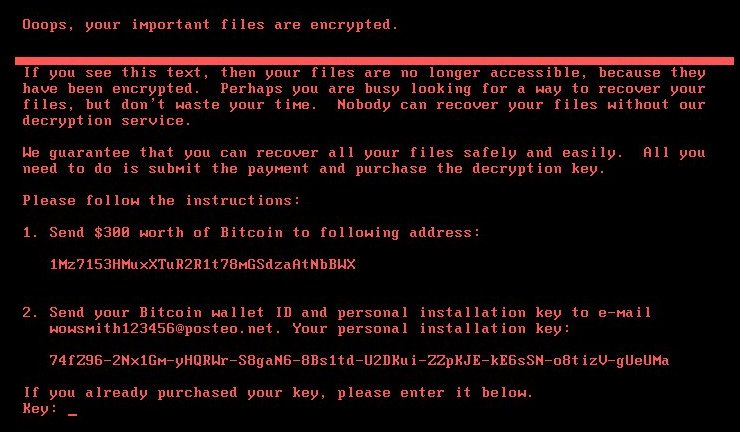
Petya Ransomware

Supportedge have been monitoring this threat since 28 June 2017

Again None of our clients have reported this infection.

What is the danger to Supportedge’s clients?

This problem is an issue for Microsoft Windows systems only. The Petya attack starts by sending spam messages containing links to download a ZIP archive. The archive contains a malicious file and as well as a JPEG image. The file names are in German at this stage, the file names are made to look like resumes for job candidates, for this reason the main is HR staff in German-speaking countries.

Australia has not been hit by a wave of attacks. This attack uses the same exploit in Windows that was used to spread WannaCry virus. There are notable differences between Petya and WannaCry, the largest is, WannaCry had a kill switch, Petya does not! If you are infected by Petya Your computer becomes locked and held at ransom (no access to the operating system).

The top 5 countries that have been affected

  1. Germany
  2. China
  3. India
  4. Japan
  5. Russian Federation

What do I do to protect myself?

Call us, we will check your system and report the risk. If you’re a subscription client we have already checked your systems, you don’t need to do anything.

If you’re interested in self-checking your system and you don’t need our help you can find more information and procedures here: https://technet.microsoft.com/en-us/library/security/ms17-010.aspx As a part of your self-checks please also make sure to validate your backups.

Ask about our computer monitoring tool!

Not only will this software provide centralised and market-leading anti-virus protection, it will also conduct a thorough series of checks each and every morning before you start work. Checks include:

Way more to come: WannaCry and Malware

Posted on: May 17th, 2017 by system No Comments

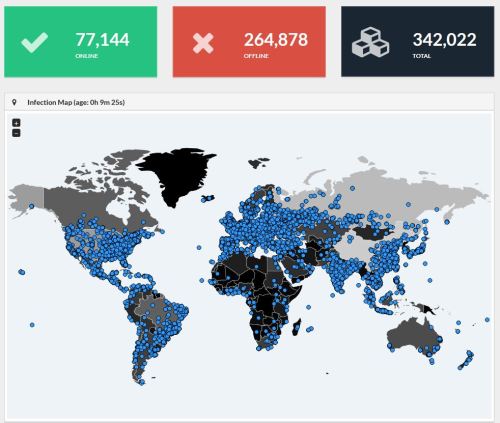
WannaCry Global Infection rate at 11am 16.05.17 AEST

WannaCry Global Infection rate at 11am 16.05.17 AEST

Source: MalwareInt https://intel.malwaretech.com


Supportedge have been monitoring this issue since 12th May 2017.

The good news is none of our clients have reported this infection or system breach to date. The bad news is this is still a big concern.

If we originally setup your network and no changes have been made to the systems we put in place. Supportedge’s security policies have been protecting you from external threats like this.

What is the danger to Supportedge’s clients?

This problem is an issue for Microsoft Windows systems only. The largest risk factor at this stage is an internal infection. If an infected computer is physically connected with a cable or Wi-Fi to your network you must have Microsoft’s security update MS17-010 that was released in March to be protected.

You have seen this cyber security problem in the News. What’s WannaCry (semi-technical)?

WannaCry leverages the ETERNALBLUE exploit. It’s a problem with the way computer systems share files with each other. To prevent penetration, block ports 135, 139 and 445.

What do I do to protect myself?

Call us, we will check your system and report the risk. If you’re a subscription client we have already checked your systems, you don’t need to do anything.

If you’re interested in self-checking your system and you don’t need our help you can find more information and procedures here: https://technet.microsoft.com/en-us/library/security/ms17-010.aspx As a part of your self-checks please also make sure to validate your backups.

I’ve been infected, what now?

First thing is to turn off the infected computer. Most likely the only recovery is your backups. Call us and we will start your system in our security lab so that we can recover your files.

#MalwareTech #Ransomware #CyberSecurity #WannaCry #wannacrypt #supportedge