
52/6 Herbert Street
ST LEONARDS 2065
02 8007 2930
ua.moc.egdetroppus@troppus
52/6 Herbert Street
ST LEONARDS 2065
02 8007 2930
ua.moc.egdetroppus@troppus
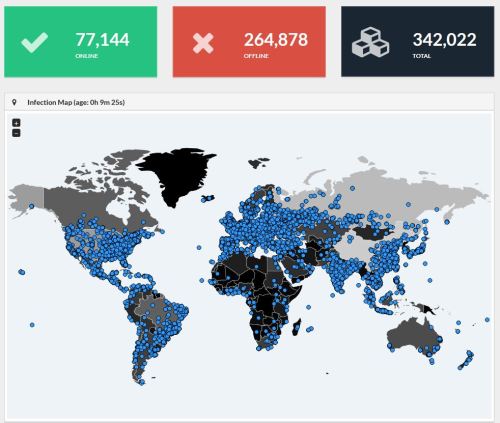
WannaCry Global Infection rate at 11am 16.05.17 AEST
Source: MalwareInt https://intel.malwaretech.com
Supportedge have been monitoring this issue since 12th May 2017.
The good news is none of our clients have reported this infection or system breach to date. The bad news is this is still a big concern.
If we originally setup your network and no changes have been made to the systems we put in place. Supportedge’s security policies have been protecting you from external threats like this.
What is the danger to Supportedge’s clients?
This problem is an issue for Microsoft Windows systems only. The largest risk factor at this stage is an internal infection. If an infected computer is physically connected with a cable or Wi-Fi to your network you must have Microsoft’s security update MS17-010 that was released in March to be protected.
You have seen this cyber security problem in the News. What’s WannaCry (semi-technical)?
WannaCry leverages the ETERNALBLUE exploit. It’s a problem with the way computer systems share files with each other. To prevent penetration, block ports 135, 139 and 445.
What do I do to protect myself?
Call us, we will check your system and report the risk. If you’re a subscription client we have already checked your systems, you don’t need to do anything.
If you’re interested in self-checking your system and you don’t need our help you can find more information and procedures here: https://technet.microsoft.com/en-us/library/security/ms17-010.aspx As a part of your self-checks please also make sure to validate your backups.
I’ve been infected, what now?
First thing is to turn off the infected computer. Most likely the only recovery is your backups. Call us and we will start your system in our security lab so that we can recover your files.
#MalwareTech #Ransomware #CyberSecurity #WannaCry #wannacrypt #supportedge
The “cloud” has become a household name in the past couple of years, but what does it actually mean and what can it do for your business and home? According to info-world.com: “Cloud computing encompasses any subscription-based or pay-per-use service that, in real time over the Internet, extends IT’s existing capabilities… Cloud computing is at an early stage, with a motley crew of providers large and small delivering a slew of cloud-based services, from full-blown applications to storage services to spam filtering.” Howstuffworks.com describes what cloud computing does: “In a cloud computing system, there’s a significant workload shift. Local computers no longer have to do all the heavy lifting when it comes to running applications. The network of computers that make up the cloud handles them instead. Hardware and software demands on the user’s side decrease. The only thing the user’s computer needs to be able to run is the cloud computing system’s interface software, which can be as simple as a Web browser, and the cloud’s network takes care of the rest.” An everyday example of cloud computing, that most people have encountered, can be found within web-based email accounts like, gmail, hotmail and yahoo. Your own computer only [&hellip
What computer systems do you work with? Just about everything. Do you charge for travel time? Not for local bookings – only when extended travel is involved. Do you have an office where I can take my faulty computer to get repaired? Yes, you can find us at Suite 52, 6-8 Herbert Street St Leonards. Please call-ahead first, so that we are best prepared for the job. What about the warranty on the products I buy from you? All new products come with the manufacturer’s warranty. Second hand products have a 90 day warranty
The most common data recovery procedure we perform involves a computer that won’t boot due to a drive failure. This is most often caused by a bump or a knock to the computer while the hard disk is writing critical data. Sometimes the head physically crashes into the the plater. This is where the term ‘hard drive crash’ originated. Of course failure of spinning hard disks happens for many reasons include wear and tear. Some drives spin at 10,000 rpm with as little as 3 nanometres separating the drive head from the disk plater. This provides very little room for error. Something that goes hand in hand with data recovery is your backup plan. If you don’t have a backup policy in place please contact us straight away for a tailor made solution. To ensure we can recover as much data as possible stop using the media or the effected computer straight away. Stage one recovery prices start from only $250 for most media types including hard drives, discs and flash cards. This price includes GST and the replacement drive. In most situations we can recover your data in this first stage. The second stage of disc recovery is the [&hellip

| 52/6 Herbert Street ST LEONARDS 2065 |
