
52/6 Herbert Street
ST LEONARDS 2065
02 8007 2930
ua.moc.egdetroppus@troppus
52/6 Herbert Street
ST LEONARDS 2065
02 8007 2930
ua.moc.egdetroppus@troppus
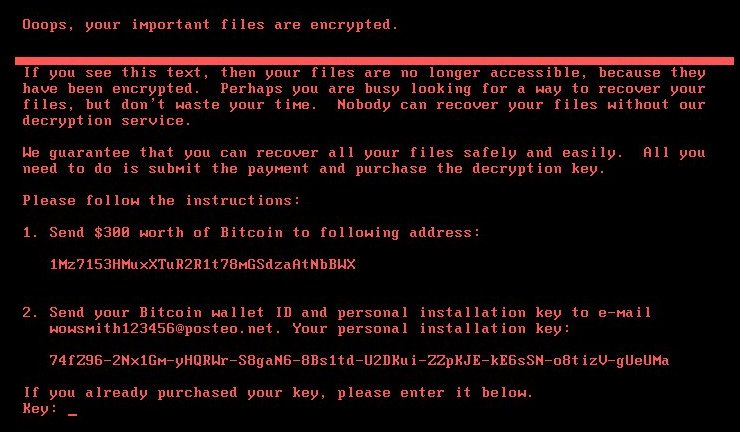
Supportedge have been monitoring this threat since 28 June 2017
Again None of our clients have reported this infection.
What is the danger to Supportedge’s clients?
This problem is an issue for Microsoft Windows systems only. The Petya attack starts by sending spam messages containing links to download a ZIP archive. The archive contains a malicious file and as well as a JPEG image. The file names are in German at this stage, the file names are made to look like resumes for job candidates, for this reason the main is HR staff in German-speaking countries.
Australia has not been hit by a wave of attacks. This attack uses the same exploit in Windows that was used to spread WannaCry virus. There are notable differences between Petya and WannaCry, the largest is, WannaCry had a kill switch, Petya does not! If you are infected by Petya Your computer becomes locked and held at ransom (no access to the operating system).
The top 5 countries that have been affected
What do I do to protect myself?
Call us, we will check your system and report the risk. If you’re a subscription client we have already checked your systems, you don’t need to do anything.
If you’re interested in self-checking your system and you don’t need our help you can find more information and procedures here: https://technet.microsoft.com/en-us/library/security/ms17-010.aspx As a part of your self-checks please also make sure to validate your backups.
Ask about our computer monitoring tool!
Not only will this software provide centralised and market-leading anti-virus protection, it will also conduct a thorough series of checks each and every morning before you start work. Checks include:
Please contact us for proposals on business grade fibre and midband data links. We can offer solutions from just about any provider (ISP) in Sydney
All of our customers are valued at Supportedge, no matter what size your business is. We are determined to deliver competitive prices and efficient services to each and every one of our clients. Supportedge has longstanding customers from a wide range of businesses of all different sizes. We work closely with such a diverse clientele to ensure that their technological systems suit their specific business requirements. Check out our brief and our social media if you would like to read more about us and what we do, or contact us directly for a quote
Supportedge MAX: Our security software to proactively monitor and check your workstations, servers, and network assets. Click icon to download Support Console: Our Support Console is designed to give us quick and easy access to your computer. In rare cases, our main “Remote Help” button may not work for the technical aspects of your computer. We’ve prepared this Support Console as an alternative just in case our first method doesn’t work. Click the circle icon below to download the Zoho Support Console. PeaZip Portable: PeaZip is a free archiver tool. The application provides an unified, natively portable, cross-platform file manager and archive manager GUI for many Open Source technologies like 7-Zip, FreeArc, PAQ, UPX. Carbonite Toolkit: Use this file to easily configure your Carbonite backup with file extensions that are not backed up by default. Also includes quick instructions for making sure you get the most comprehensive backup. Visit the Carbonite website. Cloud Station Drive 4: Sync files among your Synology NAS and computers. Visit the Synology website. Foxit Reader: Whether you’re a consumer, business, government agency, or educational organization, you need to read, create, sign, and annotate (comment on) PDF documents and fill out PDF forms. Foxit is a tiny [&hellip

| 52/6 Herbert Street ST LEONARDS 2065 |
